Mixture-Tuned Matched Filtering (MTMF)
MTMF estimates the relative abundance of a known target spectrum — which we take to represent the mineral — within a pixel, without needing to know what else is in the mix. That is the practical difference from SAM and SFF, which ask how well the pixel resembles a reference. MTMF asks what fraction of the pixel's signal the target accounts for.
The algorithm has two parts, and the second is where its name comes from:
- Matched filtering scores how much of the target the pixel could contain, measured against the scene's own background statistics.
- Mixture tuning computes an infeasibility value for that score: how physically implausible the estimated abundance is, given those same statistics.
Matched filtering on its own produces false positives at low abundance, where pixels containing little or none of the target score like pixels containing a real trace. Infeasibility is what separates the two. Read properly, a candidate is a high abundance score with a low infeasibility; a high score with high infeasibility is an artifact.
In TerraEye the layer you get is the abundance score, with values closer to 1 meaning greater relative abundance and values below 0.2 drawn transparent. If you cannot see an infeasibility layer beside it, treat the output as matched filtering rather than full MTMF, and lean correspondingly harder on the curve check.
Why abundance is a useful question
Satellite pixels are mixtures. At 60 m, a genuine but small exposure occupies a fraction of the pixel and its absorption features arrive diluted. A method that scores similarity penalizes that dilution. A method that estimates abundance can report a small fraction of the target as a small fraction, which is closer to what you want to know.
MTMF is also one of the methods behind the mineral sets in Preset Layers, alongside SAM and GSI.
Adding the layer
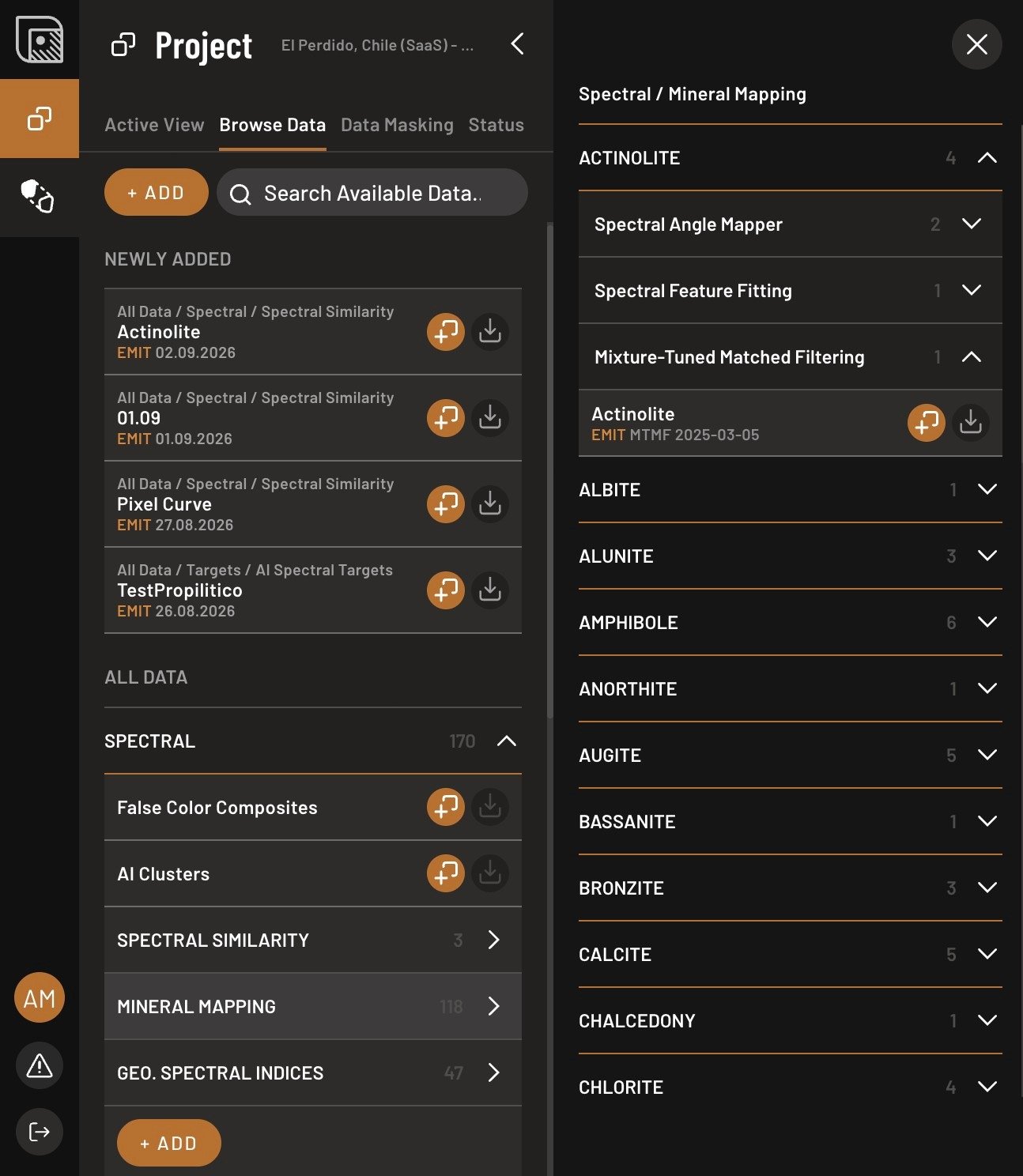
- Open the Browse Data tab, open Spectral → Mineral Mapping, pick the mineral, expand Mixture-Tuned Matched Filtering, and click Add layer.
- Set the range with the sliders. Below 0.2 nothing draws.
- Set the color, or switch to gradient mode, in the layer properties.
Where it misleads
It is a hyperspectral method. On Sentinel-2, where two broad SWIR bands carry all the mineral information, the background statistics have almost nothing to work with. The output still ranks pixels, but the number is not an abundance, and it should be read at group level like SAM.
The values do not travel. The score is computed against this scene's background under this mask. Change the area, the provider, or the mask variant, and the same mineral at the same abundance scores differently. MTMF values are not comparable between areas, and not comparable between mask variants within one area. Record which mask produced a number if you intend to quote it.
Values outside 0 to 1 are a warning. They mean the reference is a poor endmember for your ground rather than that the mineral is unusually abundant.
Low-abundance false positives are the known weakness, for the reason above. Take the abundance estimate as a ranking, confirm the pixel in the Analogy Lab, and do not carry an MTMF number forward as a measurement.