Phase 4 · Load layers
Orientation first
Switch on the False Color Composites (FCC) to see how the area splits up spectrally. It often points straight at alteration zones and lithology contacts, so you know where to focus before you commit. It's an orientation, not a measurement: an FCC color never counts as a result.
Lead with SFF
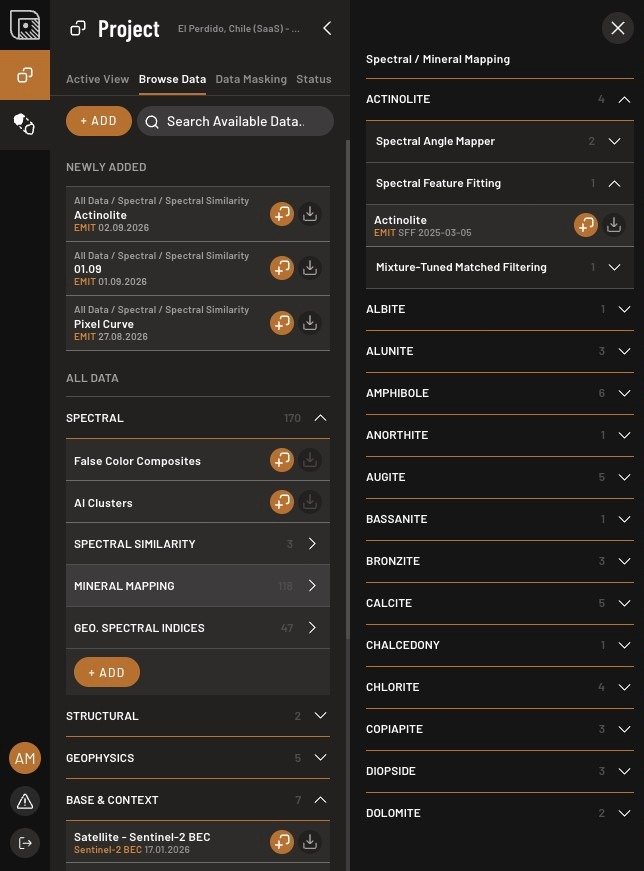
We recommend prioritizing Spectral Feature Fitting (SFF) first. To do this navigate to Project → Browse Data → Spectral → Mineral Mapping → select a mineral → click SFF. This is likely to be your most reliable match, and it requires hyperspectral data (like EMIT). Then use Spectral Angle Mapper (SAM) and Geological Spectral Indices (GSI) for the same or related minerals. If you don't have hyperspectral data, SAM and GSI still will do the job, but on Sentinel-2 they resolve mineral groups, clay-like or carbonate-like, rather than a named mineral.
Optional layers
Is your deposit type not in the list? Run AI Spectral Targeting with a provider, at least 2 minerals, and your mask. It points at pixels whose spectra stand out rather than naming a mineral, so run SFF or SAM on the hits you care about, and discard hits inside your man-made shape. Ask Ignacy to help you find the best layers.
Done when
Your indicator layers show up in the Active View list.