False Color Composites (FCC)
An FCC assigns three spectral bands to the red, green and blue display channels. Because the bands are chosen for what they discriminate rather than for what the eye expects, materials that look identical in true color separate into distinct colors.
Change the band combination and the same ground splits differently. Change the provider and it splits differently again.
What it is for
Orientation, at the start of a pass. An FCC shows you how your area divides up spectrally, and it frequently points straight at alteration zones and lithological contacts before you have run anything. That tells you where to spend the rest of the phases.
An FCC color never counts as a result. There is no measurement behind it, no threshold, and no reference. It is a rendering. Everything you take forward comes from a method with a value you can threshold and a curve you can check.
Adding the layer
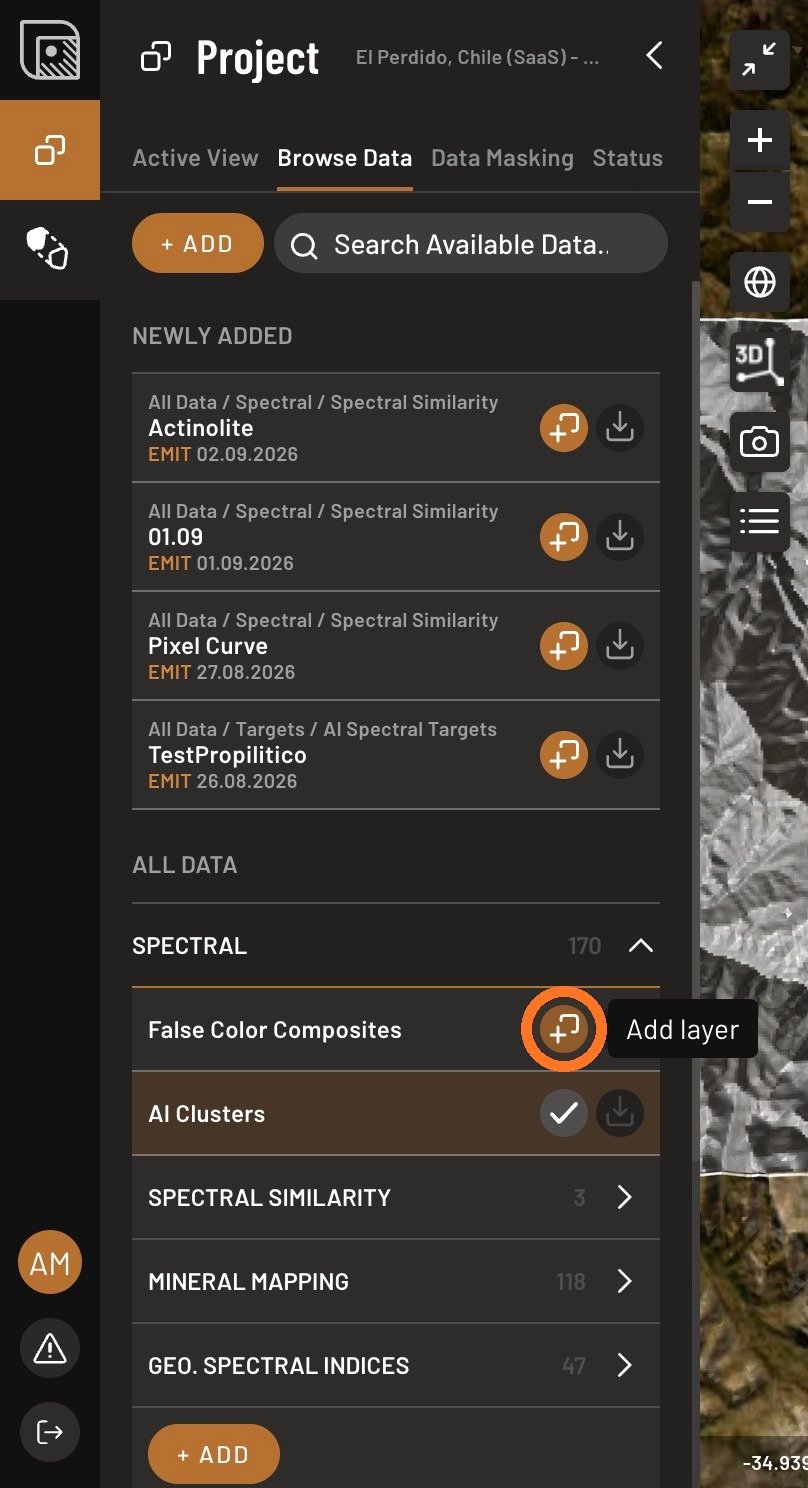
- Open the Browse Data tab, open Spectral, and click Add layer next to False Color Composites.
- Open Band Combo and pick a combination.
- Switch the satellite source to see different spectral patterns across the same ground.
Worth doing early, and worth coming back to whenever a result surprises you. A color boundary in an FCC that lines up with your candidate is a reason to look closer at the geology; a candidate that ignores every FCC boundary in the scene is a reason to check your mask.