AI Clusters
AI Clusters runs unsupervised k-means classification over the imagery and groups pixels with similar spectral signatures. Pixels in the same cluster are spectrally alike, and where exposure is good they often share a lithology. Nothing is named, and the cluster numbers carry no ranking: cluster 4 is not more prospective than cluster 3.
Raise the cluster count and the scene subdivides further, which can separate units that a coarser run merged.
Runs on multispectral and hyperspectral data.
What it is good for
Understanding a new area quickly. A clustered scene is a first-pass spectral map of your ground, and it shows structure you would not think to look for: contacts, zoning, and patches that do not match their surroundings.
It also helps you decide where to spend expensive attention. A cluster that appears in only a couple of small patches is worth inspecting in the Analogy Lab even before you know what it is.
Adding the layer
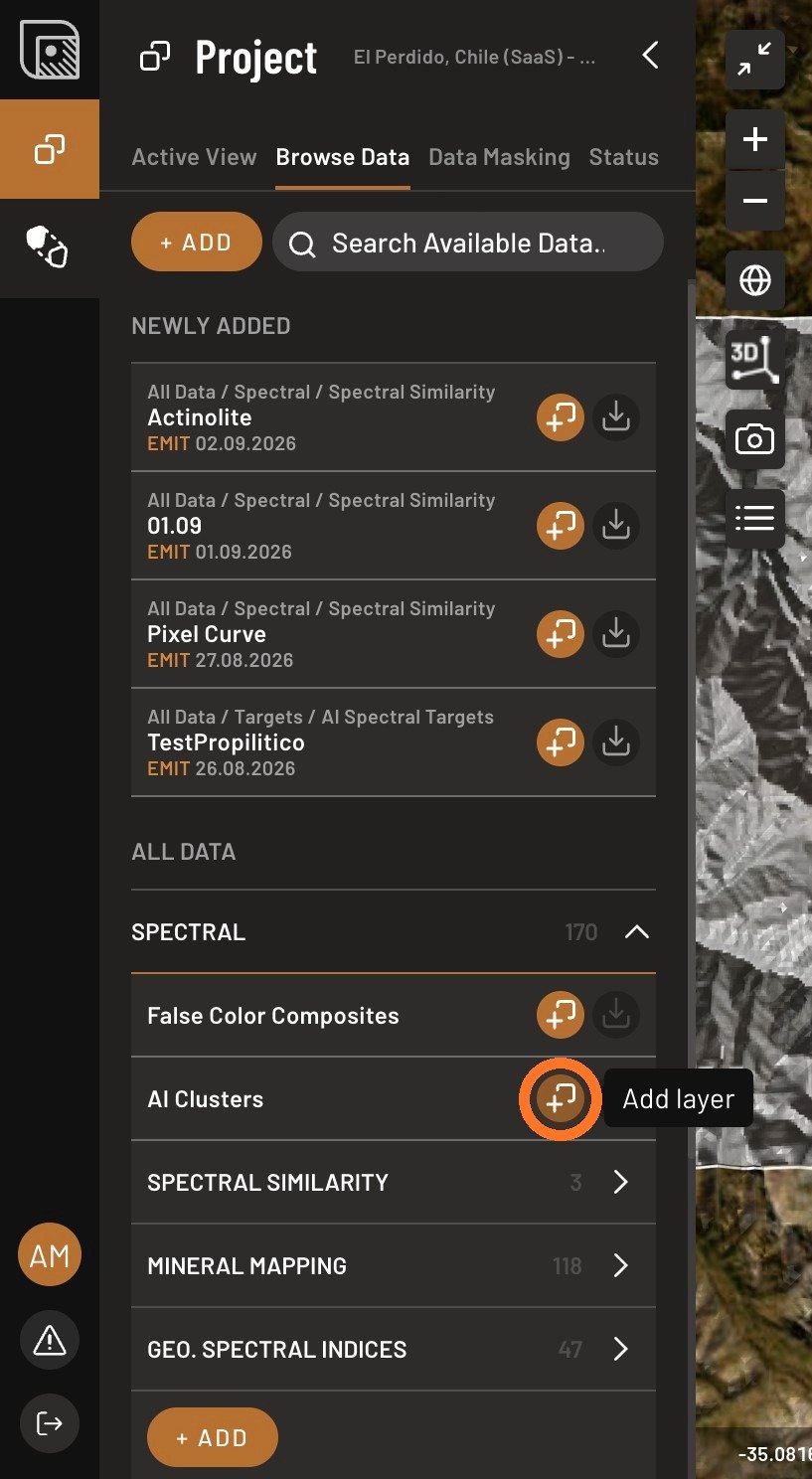
- Open the Browse Data tab, open Spectral, and click Add layer next to AI Clusters.
- Expand Provider and select the image source.
- Set the number of clusters. More clusters mean finer subdivision.
- Keep only the cluster groups that highlight what interests you. You can change the selection at any time.
Where it misleads
Clustering follows the surface, not the bedrock. If half your area is under dry grass, the strongest division in the result will be grass against not-grass, and a lithological boundary underneath it will be invisible. Mask before you cluster, and read the output as a hint about the surface rather than a geological map.
K-means is sensitive to differences in brightness and terrain shading, so these often dominate the first few divisions ahead of subtler spectral differences. That is worth knowing before you interpret a boundary: the strongest edge in a clustered scene is often an illumination edge.
Cluster numbers are labels, not identities. Their assignment is not stable between runs, so cluster 7 in one run need not be cluster 7 in the next, and changing the mask, the provider or the cluster count changes the pixel population and therefore the whole solution. Since Phase 9 asks you to record what produced a target, record a cluster by drawing its extent as a shape, never by its number.